Graphics I II III
Instructor: Marcellus Stefaniak

School Location: Window Rock High School (Fort Defiance, AZ)
Sector: Communications Media Technologies
State-Approved Program CIP Code: 50.0409.00
Sector: Communications Media Technologies
State-Approved Program CIP Code: 50.0409.00
Executive Course Framework & Overview
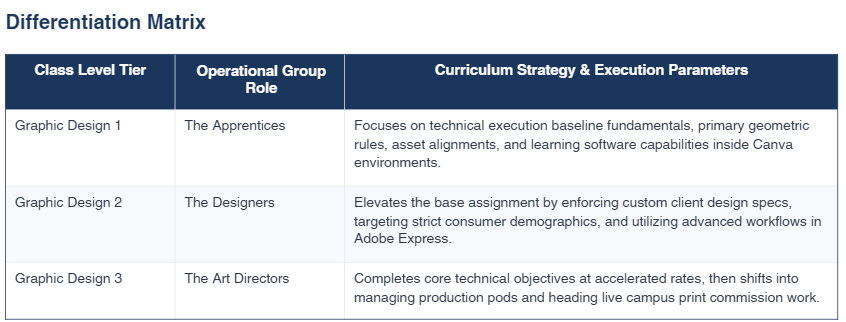
This foundational pacing roadmap maps out 32 weeks of structural technical training instructions aligned with the official Arizona Department of Education CTE standards. Built to sustain a multi-level design studio containing Graphics 1, 2, and 3 level tiers simultaneously within an hour block, this curriculum standardizes structural theory milestones while scaffolding project complexity. The web-focused deployment framework relies completely on Canva and Adobe Express, avoiding localized hardware limitations while stressing composition, client guidelines, and vector delivery protocols. The dynamic structure leaves the final month (Month 9) clear for production portfolios, end-of-year lab reviews, and makeup clearing bins.
This high school graphic design syllabus covers the basics of visual communication, digital art tools, and design projects. Students learn to use industry software, build a portfolio, and solve real-world problems using creative design skills aligned with state CTE standards.
Course Overview and Goals
Learn the Basics: Understand color, lines, shapes, and space.
Master Digital Tools: Learn beginner apps like Canva and Express, then advance to professional Adobe software.
Understand Design Rules: Study color, typography, contrast, and layout principles.
Real-World Projects: Create logos, social media graphics, posters, and branding packages.
Portfolio Development: Assemble a professional digital portfolio showcasing your best work.
Grading Breakdown
Studio Projects (40%): Major design assignments, branding packages, and portfolio pieces.
Skills Practice & Exercises (30%): Weekly software tutorials and mini-challenges in Canva and Adobe.
Quizzes & Critiques (20%): Tests on design terminology and active participation in class feedback sessions.
Professionalism & Participation (10%): Adherence to studio safety, time management, and daily workplace habits.
Lab Rules and Safety
No Food or Drinks: Keep all snacks and liquids completely away from computers. Water must stay in a closed container.
Device Care: Treat computers, tablets, and cameras with respect. Report damaged hardware immediately.
Approved Sites Only: Use the internet only for design research and class projects. No gaming or streaming.
End-of-Class Cleanup: Log out of your account, push in your chair, and clean your workspace daily.
Classroom Policies
Attendance: Be in your seat and logged in before the bell rings. Unexcused absences lower your participation grade.
Late Work: Late assignments drop 10% for each day they are overdue. Work is not accepted after one week.
Make-up Work: You get one extra day to finish assignments for each day of an excused absence. Check the portal for missed work.
Academic Honesty: All designs must be your own work. Copying graphics, stealing art, or using unauthorized AI tools results in a zero.
Month 1: Lab Safety & Digital Citizenship (Units 1-2)
• Week 1: Studio Introduction & Lab Rules: Computer anatomy, studio safety protocols, and safe workstation ergonomics.
(AZ Standards 1.11, 5.4)
Task: Create a lab safety rules graphical reference card in Canva.
• Week 2: Copyright Laws & Intellectual Property: Fair use guidelines, copyright ethics, public domain mechanics, and
plagiarism boundaries. (AZ Standards 2.1, 2.2)
Task: Build a visual infographic explaining 'Fair Use vs. Digital Piracy' in Canva.
• Week 3: The Target Audience & Design Intent: Identifying consumer target boundaries, analyzing specific target market
demographics, and establishing context intent. (AZ Standard 7.2)
Task: Formulate and design a multi-slide visual user-persona template portfolio deck.
• Week 4: Month 1 Assessment & Safety Sign-off: Mandatory workstation safety check validation and technical protocol
review. (AZ Standard 1.11)
Task: Graphics 1 & 2 pass written lab safety exams; Graphics 3 execute multi-system equipment safety audits.
Month 2: Career Readiness & Asset Planning (Units 3 & 7)
• Week 5: The Creative Job Market: Exploring modern professional design industries, design sub-disciplines, and
workplace models. (AZ Standard 3.1)
Task: Assemble a custom design career aspiration blueprint dashboard in Adobe Express.
• Week 6: Sketching & Thumbnails: Translating initial abstract client prompts to quick physical concept paper drafts before
software render. (AZ Standard 7.1)
Task: Sketch 5 physical layout thumbnails on standard scratch grids for a regional business project.
• Week 7: The Digital Wireframe: Converting low-fidelity concept sheets into highly structural interface structural block
templates. (AZ Standard 7.1)
Task: Construct a grayscale, shape-only layout wireframe grid in Canva (excluding images/type text).
• Week 8: Professional Portfolio Setup: Establishing clear production archive infrastructure and professional file pipeline
routines. (AZ Standard 3.8)
Task: Build a dedicated corporate cloud submission folder path tagged 'Level_Project_LastName_FirstName'.
Month 3: Typography & Structural Anatomy (Unit 6)
• Week 9: Classifying Fonts: Identifying and grouping font classification hierarchies (Serif, Sans Serif, Display, Script). (AZ
Standard 6.4)
Task: Construct a complete typography categorization identity chart inside Adobe Express.
• Week 10: Anatomy of a Letter: Deconstructing specific typographic structural landmarks including leading, tracking,
kerning, and baseline offsets. (AZ Standard 6.3)
Task: Map out and explicitly isolate anatomical components over large letterforms via element line pins.
• Week 11: Type Hierarchies & Pairings: Managing proportional scale weight combinations across title cards, header
zones, and dense paragraphs. (AZ Standard 6.5)
Task: Style a dynamic public event card layouts exclusively using varied structural typographic layouts.
• Week 12: Typography Assessment: Demonstrating brand message shifts purely through structural alterations of
typographic weight curves. (AZ Standard 6.5)
Task: G1 matches fonts to markets; G2/G3 reconstruct generic administrative notifications into balanced hierarchies.
Month 4: Color Theory & Technical Formats (Units 5-6)
• Week 13: The Mechanics of Color: Exploring pure physical color structures, encompassing primary wheels, secondary
shifts, and monochromatic sets. (AZ Standard 6.7)
Task: Assemble a custom geometric color matrix grid block cleanly within Canva system limits.
• Week 14: Color Harmonization Rules: Deploying advanced harmonic layouts: complementary pairs, analogous chains,
and balanced triadic systems. (AZ Standards 6.7, 6.8)
Task: Structure a 3-page brand narrative carousel post using distinct contrasting color harmony schemes.
• Week 15: Raster vs. Vector Assets: Distinguishing between pixel composition networks and math-calculated scalable
paths, analyzing density loss. (AZ Standard 5.5)
Task: Map pixel resolution pixelation degradation limits against crisp scalable shape rendering grids.
• Week 16: Mid-Term Studio Review: Consolidating comprehensive semester performance tracking files and optimizing
existing designs. (AZ Standard 3.8)
Task: Finalize structural cleanup and compress complete mid-term projects into digital grading paths.
Month 5: Digital Photography & Image Correction (Unit 8)
• Week 17: Framing & Composition Rules: Applying explicit optical balance concepts including Rule of Thirds grids,
diagonal anchors, and framing. (AZ Standards 8.1, 8.2)
Task: Capture 5 distinct site content pictures across campus mapping specified compositional overlays.
• Week 18: File Sizes & Extension Profiles: Differentiating functional output profile setups and extension constraints (PNG,
JPG, PDF, SVG layout blocks). (AZ Standard 5.10)
Task: Export a single asset under varying formats to evaluate file size footprints and structural alpha limits.
• Week 19: Nondestructive Image Adjustments: Correcting tonal values without destructively flattening baseline graphical
assets (exposure, contrast shifts). (AZ Standard 8.6)
Task: Execute dark zone exposure balance restorations on flat low-contrast image layers in Adobe Express.
• Week 20: Visual Extraction & Background Masks: Isolating visual interest targets and managing clean edge
preservation profiles. (AZ Standard 8.7)
Task: Construct a masked composite image by extracting a peer silhouette and masking into new background plates.
diagonal anchors, and framing. (AZ Standards 8.1, 8.2)
Task: Capture 5 distinct site content pictures across campus mapping specified compositional overlays.
• Week 18: File Sizes & Extension Profiles: Differentiating functional output profile setups and extension constraints (PNG,
JPG, PDF, SVG layout blocks). (AZ Standard 5.10)
Task: Export a single asset under varying formats to evaluate file size footprints and structural alpha limits.
• Week 19: Nondestructive Image Adjustments: Correcting tonal values without destructively flattening baseline graphical
assets (exposure, contrast shifts). (AZ Standard 8.6)
Task: Execute dark zone exposure balance restorations on flat low-contrast image layers in Adobe Express.
• Week 20: Visual Extraction & Background Masks: Isolating visual interest targets and managing clean edge
preservation profiles. (AZ Standard 8.7)
Task: Construct a masked composite image by extracting a peer silhouette and masking into new background plates.
Month 6: Branding & Corporate Identity (Units 6-7)
• Week 21: Logo Anatomy & Minimalism: Structuring clean, highly identifiable brand icons optimized for multi-scale
deployment matrices. (AZ Standards 6.2, 7.3)
Task: Sketch and render a vector-based scalable minimal symbol for an active campus division club.
• Week 22: Developing Brand Guidelines: Drafting rigid, cohesive brand style assets indicating approved color hex arrays
and locked font configurations. (AZ Standard 7.3)
Task: Assemble a single-sheet technical corporate brand book blueprint detailing custom identity values in Canva.
• Week 23: Stationery & Business Kit Assemblies: Ensuring consistent thematic layout identity flow over distinct
document bounding regions. (AZ Standard 7.3)
Task: Produce a matched real-world stationary package containing professional business cards and corporate
letterheads.
• Week 24: Pitching to Your Client: Orally presenting and validating stylistic choices based on concrete strategic market
profiles. (AZ Standard 7.2)
Task: Defend custom identity layouts before assigned row lab pod critique teams under formal criteria.
deployment matrices. (AZ Standards 6.2, 7.3)
Task: Sketch and render a vector-based scalable minimal symbol for an active campus division club.
• Week 22: Developing Brand Guidelines: Drafting rigid, cohesive brand style assets indicating approved color hex arrays
and locked font configurations. (AZ Standard 7.3)
Task: Assemble a single-sheet technical corporate brand book blueprint detailing custom identity values in Canva.
• Week 23: Stationery & Business Kit Assemblies: Ensuring consistent thematic layout identity flow over distinct
document bounding regions. (AZ Standard 7.3)
Task: Produce a matched real-world stationary package containing professional business cards and corporate
letterheads.
• Week 24: Pitching to Your Client: Orally presenting and validating stylistic choices based on concrete strategic market
profiles. (AZ Standard 7.2)
Task: Defend custom identity layouts before assigned row lab pod critique teams under formal criteria.
Month 7: Advanced Layouts & Publications (Units 7-8)
• Week 25: Multi-Page Content Structures: Navigating geometric reader sight paths, grid pagination constraints, and
tracking spine inner gutter margins. (AZ Standards 7.1, 8.1)
Task: Structure a four-page tactical corporate multi-column newsletter publication in Canva.
• Week 26: Master Page Grids & Running Headers: Enforcing strict layout position consistency using structured persistent
header elements and guide systems. (AZ Standard 5.3)
Task: Construct a unified pitch master template deck featuring fixed element fields and page counts.
• Week 27: Assembling Content Blocks: Integrating large raw unformatted external editorial text assets inside predefined
bounding frames. (AZ Standard 6.5)
Task: Populate the multi-page newsletter template with complex formatted textual data blocks and isolated graphics.
• Week 28: Layout Publication Review: Evaluating holistic reading hierarchy and layout balance across complex
multi-page spreads. (AZ Standard 7.2)
Task: Direct cross-level editing cycles focused on optimizing boundary clearances and tracking readability limits.
tracking spine inner gutter margins. (AZ Standards 7.1, 8.1)
Task: Structure a four-page tactical corporate multi-column newsletter publication in Canva.
• Week 26: Master Page Grids & Running Headers: Enforcing strict layout position consistency using structured persistent
header elements and guide systems. (AZ Standard 5.3)
Task: Construct a unified pitch master template deck featuring fixed element fields and page counts.
• Week 27: Assembling Content Blocks: Integrating large raw unformatted external editorial text assets inside predefined
bounding frames. (AZ Standard 6.5)
Task: Populate the multi-page newsletter template with complex formatted textual data blocks and isolated graphics.
• Week 28: Layout Publication Review: Evaluating holistic reading hierarchy and layout balance across complex
multi-page spreads. (AZ Standard 7.2)
Task: Direct cross-level editing cycles focused on optimizing boundary clearances and tracking readability limits.
Month 8: Preflight & Output Systems (Unit 9)
• Week 29: Digital Color Profiles vs. Print Color Profiles: Analyzing display array RGB dynamics against chemical
process cyan magenta yellow black (CMYK) ink ranges. (AZ Standards 6.6, 9.1)
Task: Map hex data values using gamut shift verification scales to predict potential print conversion dullness.
• Week 30: Document Margins & Bleed Setups: Configuring physical crop tolerances to neutralize hazardous white margin
trim defects during finishing. (AZ Standard 9.2)
Task: Apply full 0.125-inch industrial print bleed frames to wide media layout canvas files inside Canva.
• Week 31: Document Preflight Verifications: Scanning operational files to isolate clipping loops, unlinked dependencies,
low-res objects, and tracking gaps. (AZ Standard 9.4)
Task: Run a comprehensive pre-flight verification step using an official administrative technical checklist layout.
• Week 32: Final Production File Delivery: Compiling completely flattened final master archives for heavy print house
publishing machinery lines. (AZ Standard 9.5)
Task: Compile and export the primary course masterpiece project into an uneditable high-density PDF Print package.
process cyan magenta yellow black (CMYK) ink ranges. (AZ Standards 6.6, 9.1)
Task: Map hex data values using gamut shift verification scales to predict potential print conversion dullness.
• Week 30: Document Margins & Bleed Setups: Configuring physical crop tolerances to neutralize hazardous white margin
trim defects during finishing. (AZ Standard 9.2)
Task: Apply full 0.125-inch industrial print bleed frames to wide media layout canvas files inside Canva.
• Week 31: Document Preflight Verifications: Scanning operational files to isolate clipping loops, unlinked dependencies,
low-res objects, and tracking gaps. (AZ Standard 9.4)
Task: Run a comprehensive pre-flight verification step using an official administrative technical checklist layout.
• Week 32: Final Production File Delivery: Compiling completely flattened final master archives for heavy print house
publishing machinery lines. (AZ Standard 9.5)
Task: Compile and export the primary course masterpiece project into an uneditable high-density PDF Print package.
Month 9: Open Lab Break & Portfolio Assembly (Weeks 33–36)
• Instructional Notice: No new technical software skills or state competency modules are scheduled during this block.
• Student Core Deliverable: Students synthesize their semester assets into a localized professional presentation showcasehosting their top 5 works.
• Administrative Routine: Focus resides on closing grading gaps, cleaning lab machines, and reviewing independentportfolios ahead of term closure.
• Instructional Notice: No new technical software skills or state competency modules are scheduled during this block.
• Student Core Deliverable: Students synthesize their semester assets into a localized professional presentation showcasehosting their top 5 works.
• Administrative Routine: Focus resides on closing grading gaps, cleaning lab machines, and reviewing independentportfolios ahead of term closure.